Skip to product information
1 of 2

Ness M1 Security & Automation Pre-Configured Starter Kit 2P

Ness M1 Security & Automation Pre-Configured Starter Kit 2P

Regular price $5,340.00
Regular price Sale price $5,340.00
Promo Sold out
GST included.

Ready to order? Use Add to Cart. CustomLink will confirm your pre-configuration requirements before preparing your system. 

Need Advice or Changes? Use Add to Quote or the assistance options below. 

View full details

WHAT'S INCLUDED IN STARTER KIT 2P?

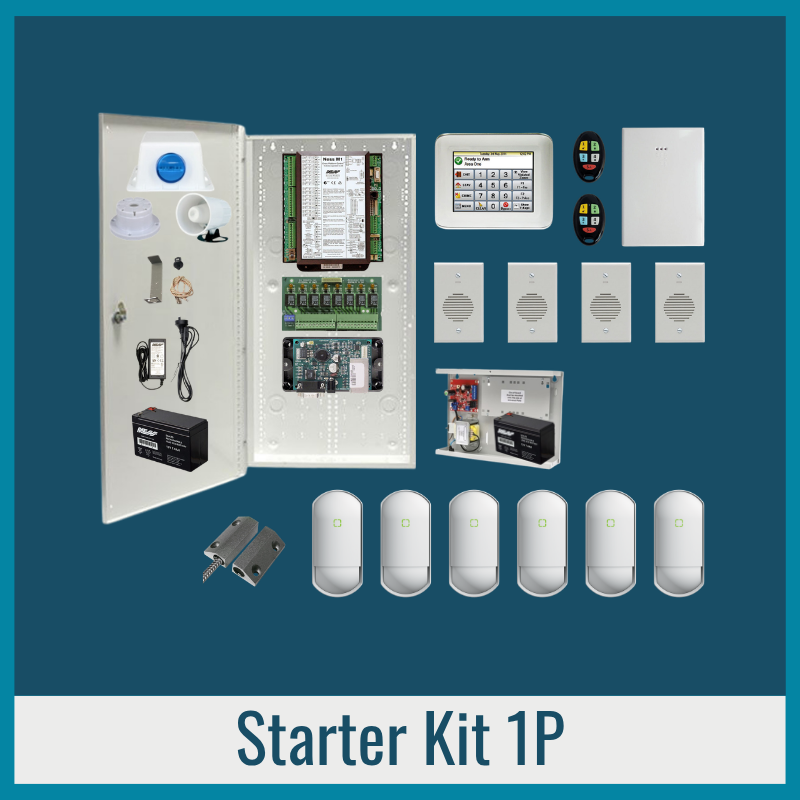
A pre-configured security and automation system combining alarm protection, voice announcements, lighting and garage-door automation.

  • Security: 6 indoor detectors, siren controls and garage-door monitoring.
  • Voice & Lighting: 4 voice speakers, movement announcements, garage-door reminders, automatic lighting and 4 relays for suitable lights or power points.
  • Garage Door Automation: Manual and automatic operation of a compatible existing garage-door motor.
  • Advanced Functions: Favourites and combined automation.

Explore the services, videos, detailed functions, equipment, support, shipping, warranty and all 6 Starter Kits below.

  • PRE-CONFIGURATION INCLUDED

    Configured and tested before dispatch, ready for installation by your installer. Deep Dive Remote Support included.

  • STANDARD REMOTE SUPPORT INCLUDED

    Free for the life of the product. Troubleshooting, operating assistance and minor adjustments to existing functions.

  • ADDITIONAL DEEP DIVE SUPPORT

    Live remote assistance with installation, programming, commissioning, testing and training. Purchase online or request a quote.

  • INSTALLATION NOT INCLUDED

    CustomLink complete installation, including on-site support, is available in Brisbane. Request a separate quote.

1 of 4

Watch the videos below to see how CustomLink helps with your project, pre-configuration, installation, remote guidance, programming and ongoing support.

STANDARD PROGRAMMING & CUSTOMISATION

Each Starter Kit includes the standard functions and programming described below.

Customisation beyond the included functions and 2 Additional Customised Favourites requires a separate quote.

INCLUDED FUNCTIONS & EQUIPMENT

ALARM & SYSTEM FUNCTIONS

Control your Ness M1 alarm system with flexible arming modes, siren controls, notifications and system fault monitoring.

Arming

  • Full Arm (Away): Arms all alarm detectors when everyone leaves.
  • Stay Arm: Arms the detectors selected for Stay Arm while allowing normal movement in other areas. For example, everyday overnight security when the family is sleeping.
  • Night Arm: Arms the detectors selected for Night Arm while allowing normal movement in other areas. For example, when visitors stay overnight, allowing movement in more areas without triggering the alarm.
  • Automatic Sleep Arming & Disarming: Enable or disable automatic Sleep Arm and Sleep Disarm separately under Function Settings. When enabled, the system automatically arms or disarms at the preset times, which can be adjusted using the keypad.
  • Two Automatic Sleep Arm Modes: Choose between Stay Arm and Night Arm under Function Settings.
  • Stay & Night Arm Detector Selection: The detectors assigned to each mode can be changed through Free Standard Remote Support, included for the life of CustomLink-supplied products.

Siren Controls & Notifications

  • Individual Siren Control: Enable or disable the internal and external sirens separately. When an armed detector triggers an alarm, enabled sirens sound and a notification is sent to the mobile app.
  • Siren-Disabled Reminder: Enable voice reminders and notifications when the internal or external sirens have been disabled. Reminder intervals can be adjusted remotely at no charge through Free Standard Remote Support for the life of the product.

System Monitoring

  • Tamper Detection: Detect tampering with the external siren or main control panel.
  • Backup Power Supply Monitoring: Monitor the external backup power supply for power failure or low battery, with notifications and voice alerts.
  • Hourly Alert Reminder: Enable or disable repeated alerts every hour while the power fault remains.

Additional Benefits & Features

  • Intruder Deterrence: Loud sirens can discourage intruders from remaining at the property.

SENSOR ALARM

Protect selected areas of your property using 6 indoor movement detectors and 1 garage-door magnetic switch.

Alarm Detection

  • Indoor Detection: Detect movement using the 6 indoor detectors.
  • Garage Door Detection: Monitor the open or closed status of the garage door using its magnetic switch.

SENSOR VOICE

Use the same 6 indoor movement detectors and 1 garage-door sensor to trigger voice announcements through the 4 included speakers.

Voice Announcements

  • Movement Announcements: Announce where movement is detected by the indoor PIR detectors.
  • Garage Door Status Announcements: Announce when the garage door opens or closes.

Voice & Speaker Controls

  • Individual Sensor Voice Control: Enable or disable voice announcements for selected detectors.
  • Master Sensor Voice Control: Enable or disable all Sensor Voice announcements together.
  • Automatic Voice Control: Enable or disable Sensor Voice automatically as part of your selected Custom Favourites, described below.
  • Individual Speaker Control: Enable or disable selected speakers.
  • Master Speaker Control: Enable or disable all speakers together.

Additional Benefits & Features

  • Intruder Deterrence: Voice announcements can warn potential intruders that their presence has been detected.
  • Security Awareness: Know where activity is detected without checking the system.
  • Disarmed Operation: Voice announcements can operate even when the alarm is disarmed.
  • Queued Announcements: Multiple voice messages are played in the order triggered.

VOICE REMINDERS

Receive spoken reminders at programmed intervals when your garage door has been left open.

Voice Reminders

  • Garage Door Left-Open Reminder: Announce when the garage door remains open beyond a programmed period.
  • Repeated Reminders: Repeat announcements at different programmed intervals while the garage door remains open. Reminder intervals can be adjusted remotely at no charge through Free Standard Remote Support for the life of the product.
  • Reminder Control: Enable or disable the garage-door reminder.

Additional Benefits & Features

  • Peace of Mind: Know when the garage door has been left open without constantly checking its status.

SENSOR LIGHT

Use the 6 indoor movement detectors and 1 garage-door sensor to trigger selected lights or power points automatically.

Sensor-Activated Lighting

  • Movement-Activated Lighting: Turn on selected lights or power points when movement is detected by the indoor PIR detectors.
  • Garage Door-Activated Lighting: Turn on selected lights or power points when the garage door opens.
  • Automatic Light-Off: Turn off selected lights or power points after a programmed period.
  • Lighting Timer Reset: Each new detection restarts the programmed lighting timer.

Lighting Controls

  • Manual Lighting Control: Manually turn selected lights or power points on or off.
  • Master Lighting Control: Manually turn all connected lights and power points on or off together.
  • Individual Sensor Light Control: Enable or disable Sensor Light functions for selected detectors.
  • Master Sensor Light Control: Enable or disable all Sensor Light functions together.

Additional Benefits & Features

  • Everyday Convenience: Automatically illuminate selected areas without needing to operate light switches.
  • Intruder Deterrence: Automatically illuminate selected areas to draw attention to detected movement.
  • Welcoming Visitors: Illuminate selected entrances and pathways when visitors arrive.

LIGHTING AUTOMATION

Control selected lights and power points automatically through programmed schedules, sunset, sunrise and system events.

Included Functions

  • Sunset Sensor Light: Automatically enable selected Sensor Light functions at sunset.
  • Bedtime Sensor Light: Enable a different selection of Sensor Light functions at bedtime.
  • Sunrise Sensor Light: Automatically disable Sensor Light functions at sunrise by default.
  • Scheduled Lighting: One pre-programmed schedule for connected lights or power points. Additional schedules can be selected under Additional Customised Favourites.
  • Away Lighting: Turn selected lights or power points on and off at varying times to simulate occupancy while away, stopping when the system is disarmed.

Additional Benefits & Features

  • Security & Deterrence: Illuminate selected areas automatically when movement is detected.
  • Convenience: Automatically manage connected lights and power points according to time and daily routines.
  • Simulated Occupancy: Make your property appear occupied while you're away.

DOORS & GATES AUTOMATION

Monitor and control 1 motorised garage door manually or automatically.

Garage Door

  • Manual Control: Open or close the garage door using the keypad, mobile app or remote control.
  • Automatic Closing: Automatically close the garage door after a programmed period if left open, when enabled.
  • Arming & Disarming Automation: Automatically operate the garage door when selected alarm arming or disarming commands are activated, if enabled.
  • Automatic Operation Control: Enable or disable automatic garage-door functions.

Additional Benefits & Features

  • Convenience: Operate your garage door remotely or through automatic functions.
  • Peace of Mind: Check whether your garage door is open or closed.
  • Security: Automatically close a garage door left open, subject to suitable safety controls.

Important

  • Automatic garage-door operation requires a compatible motor, completed installation and suitable safety controls.

PRE-PROGRAMMED FAVOURITES

A Favourite can execute multiple functions or commands, including other Favourites. It can be activated with one touch from your keypad, mobile app, remote-control button or wall-mounted push button, or run automatically through programmed schedules, events or conditions.

Automatic & One Touch

  • Sensor Voice Master: Enable or disable all Sensor Voice functions with one touch.
  • Sensor Light Master: Enable or disable all Sensor Light functions with one touch.
  • Speaker Master: Enable or disable all 4 speakers together with one touch.
  • Leaving Home: One command can arm selected detectors, turn off connected lights, close the garage door and enable selected automation settings. Can also be assigned to the remote control's Arm Away command. Arming from the keypad or mobile app does not activate this Favourite.
  • Arriving Home: One command can operate the garage door, disarm the alarm and turn on selected connected lights. Can also be assigned to a remote-control command. The corresponding keypad or mobile app command does not activate this Favourite.

Require Settings (Enable/Disable or Select Operation)

  • Sunset Sensor Light: Enable Sensor Light automatically at sunset. Detectors selected for sunset operation will trigger their assigned lights when activated.
  • Bedtime Sensor Light: Enable selected Sensor Light functions automatically at bedtime. Detectors selected for bedtime operation will trigger their assigned lights when activated.
  • Scheduled Lighting: Enable or disable the programmed lighting schedule. Additional lighting schedules can be added under Additional Customised Favourites.
  • Away Lighting: Enable simulated occupancy lighting while away.

ADDITIONAL CUSTOMISED FAVOURITES

A Favourite can execute multiple functions or commands, including other Favourites. It can be activated with one touch from your keypad, mobile app, remote-control button or wall-mounted push button, or run automatically through programmed schedules, events or conditions.

2 Additional Customised Favourites Included

Choose 2 additional Favourites to combine functions or change multiple settings with one command. These can be activated manually with a one-touch command or automatically when enabled, based on programmed conditions or events.

Examples include:

One-Touch Favourites

  • Speaker Favourite: Choose your preferred combination of speakers to enable or disable.
  • Sensor Voice Favourite: Choose your preferred combination of Sensor Voice functions to enable or disable.
  • Everyday Favourite: Choose a combination of Favourites and function settings to restore your normal everyday operation.
  • Watching Movie Favourite: Choose which media-room lights turn on or off and which other functions activate when this Favourite is enabled.

Automatic Favourites

  • Away Alarm Response: Choose how the alarm responds when triggered in Away Arm. Selected lights can turn on after sunset for a programmed period, until disarmed, or remain on until manually switched off.
  • Night Alarm Response: Choose how the alarm responds when triggered in Night Arm. Selected lights can turn on after sunset for a programmed period, until disarmed, or remain on until manually switched off.
  • Stay Alarm Response: Choose how the alarm responds when triggered in Stay Arm. Selected lights can turn on after sunset for a programmed period, until disarmed, or remain on until manually switched off.
  • Additional Scheduled Lighting: Choose additional lighting schedules, such as Schedule 2 and Schedule 3.

These are examples only. You can select your 2 additional Favourites during pre-configuration from the functions included in this package.

Additional Benefits & Features

  • One-Touch Convenience: Activate one Favourite with a single touch. A customised Favourite can be programmed to trigger multiple Favourites.
  • Personalised Automation: Choose combinations that suit your daily routines.
  • Automatic Operation: Favourites can also be activated automatically through scheduled times, detections or other programmed events.

FUNCTION SETTINGS

Enable or disable individual automatic arming, reminder and garage-door functions.

Automatic Sleep Arming & Disarming

  • Automatic Sleep Arm: If enabled, automatically arms Stay Arm or Night Arm at the programmed time, depending on the Visitor Night Arm setting.
  • Automatic Sleep Disarm: If enabled, automatically disarms Stay Arm or Night Arm at the programmed time.
  • Visitor Night Arm: If enabled, Automatic Sleep Arm uses Night Arm. If disabled, it uses Stay Arm. This setting only applies when Automatic Sleep Arm is enabled.

Garage Door Reminder

  • Garage Door Reminder: If enabled, activates left-open reminders for the garage door.

Automatic Closing on Arming

  • Garage Door Closing: If enabled, automatically closes the garage door when the alarm is armed.

Automatic Opening on Disarming

  • Garage Door Opening: If enabled, automatically opens the garage door when the alarm is disarmed.

USER CONTROL

Operate your security and automation system through the touchscreen keypad, mobile app or remote controls.

Touchscreen Keypad

  • 1 Ness M1 touchscreen keypad.
  • 6 programmable shortcuts.
  • Each shortcut can activate a single command or a Favourite that performs multiple commands.
  • Each shortcut can display one selected status, such as whether the garage door is open.
  • Other programmed controls are accessible through the keypad menus.
  • Operates locally without an internet connection.

Mobile App

  • Access programmed system controls, Favourites and available status information.
  • Remote operation requires internet connectivity.
  • Third-party subscription of approximately $30 per year.

Remote Controls

  • 2 Ness M1 remote controls included.
  • 4 programmable buttons per remote control.
  • Buttons can operate individual commands or activate Favourites.

INCLUDED EQUIPMENT

Main Control System

Warning Devices

Detection Devices

Voice Announcement

Automation Hardware

External Backup Power Supply

User Control

240V LIGHTS & POWER POINTS INTEGRATION

  • 1 x Ness M1 Output Expander M1XOVR 101-212
  • 1 x B&R Plastic Enclosure (to house relays below) including DIN rails to fit inside B&R Enclosure
  • 4 x Finder Relay Base
  • 4 x Finder Relay 12VDC Coil, 250VAC10A 2-Pole Contacts.

The 4 relays allow the Security & Automation system to control up to 4 suitable existing 240V lights, power points or other electrical devices.

A relay works like an additional light switch, except it is operated electronically by the Security & Automation system.

If you have a Clipsal CBUS Lighting system, please contact us, as the 240V integration relays may not be required. We can also provide a CBUS integration quote if you are interested.

PRE-CONFIGURATION INCLUDED

CustomLink configures and tests your system before dispatch to reduce installation and setup work.

Included Pre-Configuration

  • Ness M1 System: Standard alarm, voice, lighting, garage-door and automation programming.
  • System Testing: Bench-test the equipment and standard functions before dispatch.

After Installation

Selected lighting functions require final configuration and testing after the equipment is installed. These are covered by the included Deep Dive Remote Support described below.

FREE STANDARD REMOTE SUPPORT

Free Standard Remote Support is included for the life of CustomLink-supplied products.

What's Included

  • Assistance with system operation and existing functions.
  • Mobile app guidance and settings.
  • Minor adjustments to existing programming.
  • Changes to voice reminder intervals.
  • Minor adjustments to existing lighting settings.
  • Troubleshooting and diagnostics for CustomLink-supplied equipment.

Advanced programming, new functions and customised integration are not included. Deep Dive Remote Support is available for these services.

DEEP DIVE REMOTE SUPPORT

2 Hours Included with Starter Kit 2P

The included 2 hours are intended for the functions below but are not limited to them. You can prioritise other Deep Dive Support needs within the available time.

Lighting Automation

  • Configure the included lighting automation functions using the customer's preferred connected lights and power points.
  • Test the selected lighting functions.

Additional Deep Dive Support

  • Live remote installation guidance, advanced programming, commissioning, testing and user training are available separately.
  • If the included 2 hours are used for other priorities or run out before all work is completed, additional Deep Dive Support can be purchased online or quoted.

SHIPPING, WARRANTY & RETURNS

FREE AUSTRALIA-WIDE SHIPPING

Free shipping is included within Australia.

2-YEAR BACK-TO-BASE WARRANTY

This package includes a 2-year Back-to-Base warranty.

  • Products requiring warranty assessment may need to be returned to CustomLink.
  • On-site warranty inspection is not included unless separately arranged or quoted.
  • See our Warranty Policy for full details.

CANCELLATIONS, RETURNS & REFUNDS

  • Return requests must be submitted within 30 days of receiving your order.
  • Pre-configured, Special Order and custom-built products cannot be cancelled, refunded or returned for store credit unless covered by a valid warranty claim or consumer guarantee.
  • See our Returns & Refunds Policy for full details.

NEED HELP OR WANT TO MAKE CHANGES?

Have a question, need installation assistance or want to customise this package?

Thank You — Enquiry Submitted

Your Ness M1 package enquiry has been submitted.

CustomLink will normally respond within 1–2 business days using your preferred contact method.

NESS M1 PACKAGE - ENQUIRY OR CALLBACK

Interested in this package but need to confirm its suitability, functions, installation requirements or possible changes?

Tell us what you'd like to discuss so we can provide relevant advice

    Monday to Friday, 9am–5pm. We will do our best to accommodate your preference.

    ASSESSMENT REQUEST SUBMITTED SUCCESSFULLY

    Thank you for your Free Remote Assessment request.

    CustomLink will contact you within 1–2 business days, taking your preferred contact method and callback time into account.

    We will call to conduct the remote assessment. If you're unavailable, we'll arrange another suitable time.

    REQUEST A FREE REMOTE ASSESSMENT

    Show us your property during a live video call to discuss equipment locations, installation requirements and approximate labour time.

    We'll call to conduct the assessment. If you're unavailable, we'll arrange another suitable time.

      Alternatively, call 1300 122 520 or email sales@customlink.com.au.

      WANT TO LEARN MORE ABOUT ONE SYSTEM?

      Explore our detailed videos covering detection, responses, automation and integrated security.