EXPLORE & COMPARE BEFORE DECIDING

Take your time to explore what this system can do and compare it with other systems you're considering or already have.

There are many equipment, function and installation options to consider. If you'd like help understanding what's included, exploring additional functions or arranging a free remote site assessment, we're happy to assist.

You'll find the assistance options further down this page.

Skip to product information
1 of 1

Ness M1 Advanced Security & Automation — Pre-Configured Kit 1.1.3

Ness M1 Advanced Security & Automation — Pre-Configured Kit 1.1.3

Regular price $3,999.00
Regular price $4,699.00 Sale price $3,999.00
Promo Sold out
GST included.

Ready to Order? Use Add to cart. CustomLink will confirm your pre-configuration requirements before preparing the system. 

Need Advice or Changes? Use Add To Quote for assistance or a customised package. 

View full details

Services

Pre-Configuration Included

CustomLink configures the system before dispatch, reducing installation and programming work.

Deep Dive Remote Support Not Included

Can be quoted or purchased separately for installation guidance, programming, testing and training.

Brisbane Installation Not Included

Your installer completes physical installation, wiring, connections, and final commissioning. CustomLink on-site installation is available separately in Brisbane.

Functions Included

Alarm Areas & Arming Modes

Alarm Areas

  • One (1) Alarm Area is included in the pre-configuration

Arming Modes

  • Full Arm (Away): Arms all configured alarm detectors when everyone leaves the property.
  • Stay Arm: Arms selected indoor detectors while allowing normal movement in other areas.
  • Night Arm: Arms selected indoor detectors to provide protection while occupants are sleeping.
  • Automatic Arming & Disarming: Individually enable or disable automatic Full, Stay and Night arming, and authorised automatic disarming under programmed conditions.

Detector selection for Stay and Night modes is agreed during pre-configuration and may be adjusted after installation.

Voice Announcement & Reminders

Sensor Voice — Security, Deterrence, Reminders & Peace of Mind

Know what's happening around your property without constantly checking the alarm system or garage door.

For example:

  • Movement Detection: Announce when movement is detected by any of the 8 indoor detectors, helping you know where activity is occurring.
  • Intruder Deterrence: Voice announcements can warn potential intruders that their presence has been detected.
  • Garage Door Status: Announce when the monitored garage door opens or closes.
  • Helpful Reminders: Provide voice reminders when the garage door has been left open longer than a programmed period.
  • Security Awareness: Alert people at the property to detected activity, even when the alarm is disarmed.

Included Sensor Voice & Speaker Programming

All 8 indoor detectors and the garage-door contact are individually programmed for applicable Sensor Voice functions.

  • Each Sensor Voice function can be enabled or disabled individually.
  • Sensor Voice Master: Enable or disable all Sensor Voice functions together.
  • Each of the 3 voice announcement speakers can be enabled or disabled individually.
  • Speaker Master: Enable or disable all 3 speakers together.
  • Multiple Sensor Voice messages are queued and played in the order triggered.
  • Selected system tamper events also have programmed voice announcements.
  • Sensor Voice can operate even when the alarm is disarmed, providing everyday awareness and convenience.

Garage Door — Monitoring, Reminders & Automation

The package includes a garage-door contact and relay board to support monitoring and control of one compatible existing motorised garage door.

Included programming provides:

  • Door Status: Monitor whether the garage door is open or closed.
  • Voice Announcements: Announce garage-door opening and closing.
  • Left-Open Reminders: Provide voice reminders if the garage door remains open beyond a programmed period.
  • Manual Operation: Open or close the garage door using a programmed keypad, mobile app or remote-control command.
  • Automatic Closing: Close the garage door after a programmed period if left open, when enabled.
  • Arming/Disarming Automation: Automatically open or close the garage door under selected programmed arming or authorised disarming conditions.
  • Individual Controls: Enable or disable garage-door reminders and applicable automatic operation functions separately.

Garage-door operation requires compatible motor connections, completed installation and suitable safety controls. Automatic closing is only enabled where appropriate safety requirements are satisfied.

Pre-Programmed Favourites

The following commonly used automation functions are included and can be enabled or disabled through one-touch controls:

  1. Sensor Voice Master: Enable or disable all Sensor Voice functions.
  2. Sensor Light Master: Enable or disable all Sensor Light functions.
  3. Speaker Master: Enable or disable all voice announcement speakers.
  4. Sunset Sensor Light: Enable selected Sensor Light functions automatically at sunset.
  5. Bedtime Sensor Light: Enable selected Sensor Light functions at bedtime.
  6. Scheduled Lighting: Three separate programmed lighting schedules.
  7. Alarm Lighting: Enable selected connected lights to respond to alarm activations.
  8. Away Lighting: Enable simulated occupancy lighting while away.
  9. Automatic Arming & Disarming: Individually enable or disable automatic Full Arm, Stay Arm, Night Arm and Disarm functions.
  10. Garage & Gate Reminders: Individually enable or disable voice reminders for the two garage doors, vehicle gate and pedestrian gate.
  11. Garage Automatic Closing: Individually enable or disable automatic closing when motorised garage doors or vehicle gates are left open.
  12. Garage Arming/Disarming Automation: Enable or disable automatic opening and closing associated with programmed arming or disarming conditions.
  13. Leaving Home: One command can arm selected detectors, turn off connected lights, close suitable motorised doors or gates and enable selected automation settings.
  14. Arriving Home: One command can open a selected garage door or vehicle gate, disarm the selected alarm area and turn on selected connected lights.

Once enabled, automatic functions operate according to their programmed schedules, detections or conditions.

Additional Customised Favourites

You can choose 5 additional Favourites to perform multiple commands or change several settings together.

Common examples include:

  1. Speaker Favourite: Enable your preferred combination of voice speakers.
  2. Sensor Voice Favourite: Enable your preferred combination of Sensor Voice functions.
  3. Custom Arm Favourite: Activate a selected customised arming arrangement.
  4. Everyday Favourite: Restore your normal everyday settings.
  5. Visitors Favourite: Change selected speaker and Sensor Voice settings when entertaining guests.
  6. Away Favourite: Activate your preferred combination of settings while away.

These are examples only. You can choose different combinations of the included functions during pre-configuration.

User Control Devices

Connected equipment and system functions can be operated manually or through Favourites, programmed schedules, detections and other system events.

This includes lighting, speakers, garage doors, vehicle gates, the pedestrian-gate electric strike, arming modes, Sensor Voice, Sensor Light and other included programmed functions.

You can enable or disable available automatic functions while retaining manual control of the connected equipment.

Keypad & Mobile App

The included Ness M1 Touch Screen keypad provides 6 programmable shortcuts for one-touch access to frequently used functions.

  • Assign a single command, such as operating the connected garage door or controlling a Master function.
  • Alternatively, assign an existing Favourite to perform multiple commands.
  • Each shortcut can indicate one selected status, such as illuminating when the garage door is open.

Shortcuts provide access with one touch. Other programmed controls are normally accessed through the menus, requiring approximately 3 clicks on the keypad or 2 clicks on the mobile app.

Single-command shortcuts do not count towards the 5 additional Favourites.

Remote Controls

The package includes 2 Ness M1 remote controls.

  • Four programmable buttons per remote control.
  • Typically, two buttons are assigned to Full Arm and Disarm.
  • Buttons can operate individual functions or activate Favourites.

Keypad & Mobile App — Local & Remote Control

Programmed functions can be accessed through the keypad and mobile app, including:

  • Alarm arming and disarming.
  • Sensor Voice and voice speaker controls.
  • Connected garage-door operation and status.
  • Favourites and other programmed automation functions.

The keypad operates locally without an internet connection. Mobile app connectivity may be affected when the internet is unavailable.

The Ness M1 mobile app requires a third-party subscription (approximately $30 per year).

Sensor Voice — Security, Deterrence, Reminders & Peace of Mind

Know what's happening around your property without constantly checking cameras, doors or gates.

For example:

  1. Movement Detection: Announce when movement is detected in selected indoor or outdoor areas, helping you know where activity is occurring.
  2. Intruder Deterrence: Voice announcements can warn potential intruders that their presence has been detected, whether inside or outside the building. Outdoor detection can provide an early warning before they reach the building.
  3. Door & Gate Status: Announce when a garage door, vehicle gate or pedestrian gate opens or closes.
  4. Helpful Reminders: Provide voice reminders when a garage door or gate has been left open longer than a programmed period.
  5. Security Awareness: Alert people at the property to detected activity, even when the alarm is disarmed.

Sensor Voice & Sensor Light Programming

All included indoor and outdoor detectors, including garage-door and gate contacts, are individually programmed for Sensor Voice and Sensor Light.

  1. Each Sensor Voice and Sensor Light function can be enabled or disabled individually.
  2. One Master control can enable or disable all Sensor Voice or all Sensor Light functions.
  3. Individual voice announcement speakers can also be enabled or disabled, with a separate Master control for all speakers.
  4. Each new Sensor Light detection restarts its programmed lighting timer.
  5. Multiple Sensor Voice messages are queued and played in the order triggered.
  6. Selected system tamper events also have programmed voice announcements.

Sensor Voice and Sensor Light can operate even when the alarm is disarmed, providing everyday awareness and convenience.

Sensor Light — Security, Deterrence & Everyday Convenience

Automatically illuminate selected areas when movement is detected, helping deter intruders while providing convenience and welcoming lighting for family and guests.

For example:

  1. Intruder Deterrence: Automatically illuminate selected outdoor areas when movement is detected, drawing attention to potential intruders.
  2. Arriving Home: Automatically illuminate selected driveway, garage or entrance lights when movement is detected.
  3. Welcoming Guests: Light up selected entrances, pathways or outdoor areas as visitors approach.
  4. Moving Around at Night: Automatically turn on selected hallway or other indoor lights when movement is detected.
  5. Everyday Convenience: Lights turn on when needed and automatically switch off after a programmed period.

Automatic Lighting — Day, Night & Away

  1. Sunset: Automatically enable selected Sensor Light functions.
  2. Bedtime: Enable a different selection of Sensor Light functions.
  3. Sunrise: Automatically disable Sensor Light functions by default.
  4. Scheduled Lighting: Three programmable lighting schedules.
  5. Alarm Lighting: Activate selected connected lights when an alarm is triggered.
  6. Away Lighting: Turn selected lights on and off at varying times to simulate normal home activity, stopping when the system is disarmed.

All connected lights can also be controlled manually.

Equipment, Shipping, Warranty & Returns

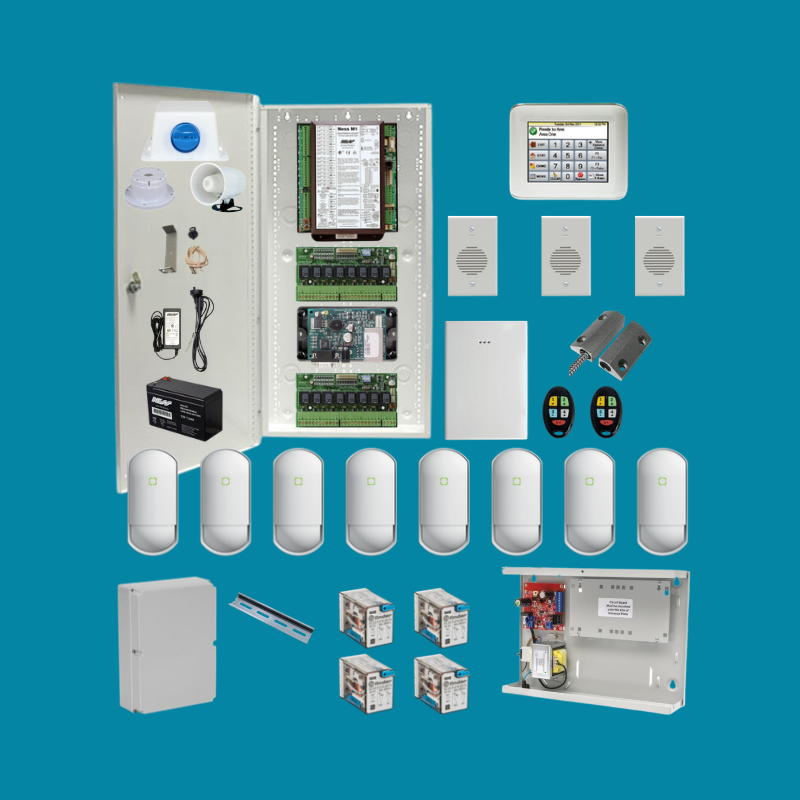
Included Equipment

Main Control System

Warning Devices

User Control

Voice Announcement

Detection Devices

Automation Hardware

240V Integration

  • 1 x B&R Plastic Enclosure (to house relays below) including DIN rails to fit inside B&R Enclosure
  • 4 x Finder Relay Base
  • 4 x Finder Relay 12VDC Coil, 250VAC10A 2-Pole Contacts. 
  • The 4 relays allow the Security & Automation system to control up to 4 suitable existing 240V lights, power points or other electrical devices.
  • A relay works like an additional light switch, except it is operated electronically by the Security & Automation system.
  • If you have a Clipsal CBUS Lighting system, please contact us as this may not be required, and we can also provide a CBUS integration quote if you are interested.

Included Free Shipping

This product includes free shipping within Australia.

Included 2-year Back-to-Base warranty

This product includes a 2-year Back-to-Base warranty.

Back-to-Base means that if a warranty assessment is required, the product may need to be returned to CustomLink in accordance with our Warranty Policy. Where required, CustomLink may forward the product for further assessment.

The warranty does not include on-site inspection unless separately arranged or quoted.

Cancellations, Returns & Refunds

Return requests must be submitted within 30 days of receiving your order.

Products requiring Pre-Configuration Service, products or orders marked as Special Order, or custom-built products cannot be cancelled, refunded, or returned for store credit unless covered by a valid warranty claim or consumer guarantee.

Please refer to the Returns & Refunds Policy for further information.

NESS M1 PRACTICAL EXAMPLES

MORE THAN A CONVENTIONAL ALARM SYSTEM

A conventional alarm is primarily designed to detect intrusions and raise an alarm.

An integrated security and automation system can go further — combining detection, voice announcements, lighting, access control and programmed responses to improve security and everyday convenience.

Watch how ONE SYSTEM brings these functions together.

These videos demonstrate what's possible with integrated security and automation. Some functions require additional equipment or programming beyond this package.

DISCOVER WHAT ONE SYSTEM CAN DO

Explore how different detections can trigger multiple responses, and how automation can make everyday life easier.

The three videos below explain:

  • Detection: What the system can detect using sensors, door contacts, intelligent video analytics and more.
  • Responses: How detections can trigger voice warnings, sirens, notifications, lighting and other programmed actions.
  • Automation: How everyday routines can be simplified through schedules, one-touch commands and automatic operation.

HOW YOUR PROJECT COMES TOGETHER

CustomLink can install your system in Brisbane or work with your own installer anywhere in Australia.

The following videos explain how projects are completed and what support is available.

FROM PLANNING TO HANDOVER

See how CustomLink coordinates equipment, installation, programming, testing and handover — whether providing on-site installation or remote guidance for your installer.

HOW CUSTOMLINK SUPPORT WORKS

Understand Free Standard Remote Support, Deep Dive Remote Support and on-site support, including assistance with programming, troubleshooting and training.

READY TO TAKE THE NEXT STEP?

Seen functions you'd like for your home or business?

CustomLink can help you confirm what's included in this package, explore additional functions and plan the right system for your project.

Thank You — Enquiry Submitted

Your Ness M1 package enquiry has been submitted.

CustomLink will normally respond within 1–2 business days using your preferred contact method.

NESS M1 PACKAGE - ENQUIRY OR CALLBACK

Have a question about this package, its functions or installation requirements?

Send your enquiry or request a callback. No property address or plans required at this stage.

    Monday to Friday, 9am–5pm. We will do our best to accommodate your preference.

    ASSESSMENT REQUEST SUBMITTED SUCCESSFULLY

    Thank you for your Free Remote Assessment request.

    CustomLink will contact you within 1–2 business days, taking your preferred contact method and callback time into account.

    We will call to conduct the remote assessment. If you're unavailable, we'll arrange another suitable time.

    REQUEST A FREE REMOTE ASSESSMENT

    Request a free remote property walkthrough to discuss equipment locations and approximate installation time.

    We will call to conduct the remote assessment. If you're unavailable, we'll arrange another suitable time.

      PLAN YOUR SYSTEM FIRST

      Not ready to enquire? Use our six Function Checklists to identify what you Need Now, Need Later or Not Needed.

      A copy of your selections will be emailed to you, so you can review and discuss them with family, business partners or your installer.

      Detection • Alarm Arming & Areas • Responses • User Control • Automation • Future Expansion

      No marketing. No sales follow-up unless requested.

      YOUR SUBMISSION HAS BEEN RECEIVED

      A confirmation email has been sent to you.

      If you requested assistance, CustomLink will contact you.

      No marketing. No follow-up unless requested.

      Security & Automation — Detection Function Checklist

      Start With What You Need Now. Expand for What's Possible Later.

      Select your preferences below. A copy will be emailed to you for your records.

      No marketing. No follow-up unless requested.

      YOUR CONTACT DETAILS

      Email is used to send your checklist. Phone is used only if you request a callback. No marketing calls.

      HOW WOULD YOU LIKE TO PROCEED?

      We can call to discuss your requirements, answer questions and guide you through the selections by phone. If you prefer, you can share your phone or computer screen during the call using TeamViewer QuickSupport to make the process easier.

      INDOOR DETECTION

      OUTDOOR DETECTION

      DOORS, WINDOWS & OTHER SENSORS

      INTELLIGENT VIDEO DETECTION

      THERMAL DETECTION

      INTERCOM & WATER DETECTION

      ENVIRONMENTAL & FIRE DETECTION

      EQUIPMENT MONITORING


      Submit to receive a copy of your selections by email.
      No marketing. No follow-up unless requested.

      YOUR SUBMISSION HAS BEEN RECEIVED

      A confirmation email has been sent to you.

      If you requested assistance, CustomLink will contact you.

      No marketing. No follow-up unless requested.

      SECURITY & AUTOMATION — ALARM ARMING & PROTECTION AREAS CHECKLIST

      Start With What You Need Now. Expand for What's Possible Later.

      Select your preferences below. A copy will be emailed to you for your records.

      No marketing. No follow-up unless requested.

      YOUR CONTACT DETAILS

      Email is used to send your checklist. Phone is only used if you request a callback. No marketing calls.

      HOW WOULD YOU LIKE TO PROCEED?

      We can call to discuss your requirements, answer questions and guide you through the selections by phone. If you prefer, you can share your phone or computer screen during the call using TeamViewer QuickSupport to make the process easier.

      ALARM ARMING MODES

      SEPARATE ALARM AREAS


      Submit to receive a copy of your selections by email.
      No marketing. No follow-up unless requested.

      YOUR SUBMISSION HAS BEEN RECEIVED

      A confirmation email has been sent to you.

      If you requested assistance, CustomLink will contact you.

      No marketing. No follow-up unless requested.

      SECURITY & AUTOMATION — RESPONSES FUNCTION CHECKLIST

      Start With What You Need Now. Expand for What's Possible Later.

      Select your preferences below. A copy will be emailed to you for your records.

      No marketing. No follow-up unless requested.

      YOUR CONTACT DETAILS

      Email is used to send your checklist. Phone is only used if you request a callback. No marketing calls.

      HOW WOULD YOU LIKE TO PROCEED?

      We can call to discuss your requirements, answer questions and guide you through the selections by phone. If you prefer, you can share your phone or computer screen during the call using TeamViewer QuickSupport to make the process easier.

      ALARM SIRENS

      SENSOR VOICE — VOICE ANNOUNCEMENTS

      VOICE ANNOUNCEMENT SPEAKERS

      VOICE REMINDERS

      SENSOR LIGHT — DETECTION-ACTIVATED LIGHTING

      NOTIFICATIONS

      PROFESSIONAL ALARM MONITORING

      ADDITIONAL SECURITY RESPONSES

      MULTIPLE & ESCALATING RESPONSES


      Submit to receive a copy of your selections by email.
      No marketing. No follow-up unless requested.

      YOUR SUBMISSION HAS BEEN RECEIVED

      A confirmation email has been sent to you.

      If you requested assistance, CustomLink will contact you.

      No marketing. No follow-up unless requested.

      SECURITY & AUTOMATION — USER CONTROL FUNCTION CHECKLIST

      Start With What You Need Now. Expand for What's Possible Later.

      Select your preferences below. A copy will be emailed to you for your records.

      No marketing. No follow-up unless requested.

      YOUR CONTACT DETAILS

      Email is used to send your checklist. Phone is only used if you request a callback. No marketing calls.

      HOW WOULD YOU LIKE TO PROCEED?

      We can call to discuss your requirements, answer questions and guide you through the selections by phone. If you prefer, you can share your phone or computer screen during the call using TeamViewer QuickSupport to make the process easier.

      USER CONTROL METHODS

      ADVANCED USER CONTROL


      Submit to receive a copy of your selections by email.
      No marketing. No follow-up unless requested.

      YOUR SUBMISSION HAS BEEN RECEIVED

      A confirmation email has been sent to you.

      If you requested assistance, CustomLink will contact you.

      No marketing. No follow-up unless requested.

      SECURITY & AUTOMATION — AUTOMATION FUNCTION CHECKLIST

      Start With What You Need Now. Expand for What's Possible Later.

      Select your preferences below. A copy will be emailed to you for your records.

      No marketing. No follow-up unless requested.

      YOUR CONTACT DETAILS

      Email is used to send your checklist. Phone is only used if you request a callback. No marketing calls.

      HOW WOULD YOU LIKE TO PROCEED?

      We can call to discuss your requirements, answer questions and guide you through the selections by phone. If you prefer, you can share your phone or computer screen during the call using TeamViewer QuickSupport to make the process easier.

      SCHEDULES & TIMING

      CONDITIONS & ACTION SEQUENCES

      AUTOMATIC ALARM CONTROL

      GARAGE-DOOR & GATE AUTOMATION

      Automatic garage-door and gate functions require appropriate safety controls.

      SCHEDULED & SCENE LIGHTING

      OTHER AUTOMATIC LIGHTING

      MOTORISED BLINDS & SHUTTERS

      WATER SYSTEMS & PUMPS

      ELECTRICAL EQUIPMENT AUTOMATION

      These functions require suitable electrical controls, safety arrangements and licensed electrical work where applicable.

      COMBINED EVERYDAY AUTOMATION


      Submit to receive a copy of your selections by email.
      No marketing. No follow-up unless requested.

      YOUR SUBMISSION HAS BEEN RECEIVED

      A confirmation email has been sent to you.

      If you requested assistance, CustomLink will contact you.

      No marketing. No follow-up unless requested.

      SECURITY & AUTOMATION — FUTURE EXPANSION CHECKLIST

      Start With What You Need Now. Expand for What's Possible Later.

      Select your preferences below. A copy will be emailed to you for your records.

      No marketing. No follow-up unless requested.

      YOUR CONTACT DETAILS

      Email is used to send your checklist. Phone is only used if you request a callback. No marketing calls.

      HOW WOULD YOU LIKE TO PROCEED?

      We can call to discuss your requirements, answer questions and guide you through the selections by phone. If you prefer, you can share your phone or computer screen during the call using TeamViewer QuickSupport to make the process easier.

      FUTURE SYSTEM EXPANSION


      Submit to receive a copy of your selections by email.
      No marketing. No follow-up unless requested.